
Auto Price Protection & Task Automation for JD
Overview
The software is designed to automate routine shopping tasks on JD.com, focusing on price protection, daily sign-ins, and coupon acquisition. It monitors recent orders for price drops and automatically applies for price protection when applicable. The tool also handles repetitive actions such as claiming Jingdong Beans, Jingdong Coins, White-Label Coupons, Plus Coupons, and full-category coupons. It supports automatic login and includes a price trend graph specifically for JD.com products. The software is intended for users who frequently shop on JD.com and want to maximize savings without manual effort. It is particularly useful for budget-conscious shoppers, regular buyers, and those managing multiple accounts. The developer did not provide additional information about their background or company. Real-world usage includes automating daily routines such as signing in, claiming rewards, and monitoring price changes after purchase. The tool aims to reduce manual intervention while ensuring users benefit from promotions and price adjustments.
Key Features & Capabilities
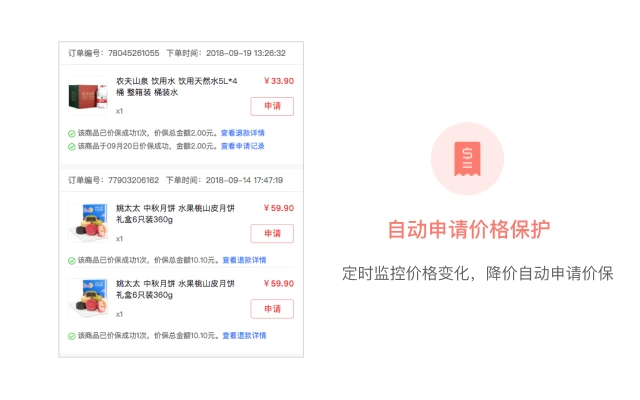
- Automatic Price Protection – Monitors recent orders for price drops and automatically submits claims when a price reduction is detected, helping users recover price differences.
- Auto Sign-in & Reward Claiming – Automates daily sign-ins for Jingdong Beans, Jingdong Coins, and JD Finance membership, ensuring users don’t miss out on small but consistent rewards.
- Auto Coupon Acquisition – Automatically claims White-Label Coupons, Plus Coupons, and full-category coupons, reducing the need for manual navigation and timing.
- Price Trend Visualization – Displays a price history graph for supported products, enabling users to track price fluctuations over time directly within the interface.
- Task Management & Logging – Tracks the execution of automated tasks, including success, failure, and timing, providing visibility into system behavior.
- Customizable Task Scheduling – Allows users to set frequency and timing for tasks, with options to avoid running during nighttime hours (00:00–06:00).
- Mobile Web Login Support – Maintains login status on mobile web versions of JD.com, including support for gesture-based login flows.
- Enhanced Task Modes – Includes new features like “Daily Bang Bang” and “Shake to Claim Jingdong Beans,” improving engagement and reward collection.
- Specialized Price Protection Mode – Offers a “Fresh Produce Price Protection Mode” for perishable goods, accounting for unique pricing patterns in that category.
These features collectively streamline the post-purchase and daily shopping experience on JD.com. For example, a user who buys a laptop can have the tool automatically check for price drops over the next 30 days and file a claim if the price falls. Similarly, a regular shopper can set the tool to claim daily rewards without needing to open the app manually. The automation reduces cognitive load and ensures no reward is missed due to oversight or timing.
User Interface, Workflow & Performance
The user interface is structured around task management, monitoring, and visualization. Navigation is organized into tabs or panels for different functions such as price tracking, task execution, and settings. The workflow is designed to be intuitive, allowing users to enable or disable specific tasks with minimal steps. The tool supports both desktop and mobile web environments, though exact performance details were not specified. The developer did not provide information on CPU or RAM usage, so actual resource consumption cannot be confirmed. General software behavior suggests it runs efficiently in the background, but users should monitor system performance during extended use. Stability is supported by regular updates addressing login failures, interface glitches, and compatibility issues. The tool includes safeguards such as rate-limiting to prevent abuse of JD.com’s systems, and it avoids running during specified off-hours to reduce system load. The developer did not specify whether the software uses local or cloud-based processing, but given the nature of automation, it likely operates locally with browser interaction.
Compatibility & System Requirements
The software is compatible with Windows and Mac operating systems. The current version is 2.4, with a file size of 120 MB. The developer did not specify exact system requirements such as minimum RAM, CPU, or disk space. Compatibility information was partially provided, and no additional hardware specifications were listed. Users should ensure their system meets general requirements for running desktop applications. The software may require access to a web browser to interact with JD.com, but the specific browser versions or configurations were not detailed. The tool is designed to work with both desktop and mobile web versions of JD.com, though the exact interaction method remains unspecified.
Pros and Cons
Pros
- Automates time-consuming daily tasks on JD.com
- Includes price trend visualization for informed decision-making
- Supports multiple reward types including beans, coins, and coupons
- Regular updates with bug fixes and new features
- Free to use with no hidden costs
- Offers specialized modes for unique product categories
- Intuitive interface with clear task status indicators
Cons
- Exact system requirements were not specified
- Performance impact on CPU/RAM not disclosed
- Relies on third-party website structure, which may break with updates
- Requires browser access and may be affected by anti-bot measures
- No official support channel mentioned
- May not work consistently across all JD.com pages
FAQ Section
Is this software compatible with Windows and Mac?
Yes, the software supports both Windows and Mac operating systems.
Is the software free to use?
Yes, the software is currently available at no cost.
Does the tool require an internet connection?
Yes, the software requires an active internet connection to interact with JD.com and perform automated tasks.
Can I use this tool without logging into JD.com?
While the tool can maintain login sessions, it requires initial login to JD.com to function properly. Automatic login is supported, but initial access is necessary.
Is the software secure and safe to use?
The software operates locally and does not collect personal data beyond what is needed for automation. However, users should exercise caution when granting access to their accounts. The developer has published a privacy policy at https://blog.jjb.im/policy.html.
Final Thoughts + CTA
This automation tool offers a robust solution for JD.com users seeking to maximize savings and minimize manual effort. Its combination of price protection, reward claiming, and task scheduling makes it a valuable asset for frequent shoppers. While some technical details remain undisclosed, the consistent update history and feature-rich design demonstrate active development and user-focused improvements. The tool is especially beneficial for those managing multiple accounts or shopping across diverse product categories. For anyone serious about optimizing their JD.com experience, this software delivers real utility. Download Auto Price Protection & Task Automation for JD now.







